# Ignited Docs
Official documentation for the Ignited Emulator, a multi-system retro gaming app for iPhones and iPads.
This guide will show you how to install Ignited and use its many features. Check out [#getting-started](#getting-started "mention") to install Ignited and start playing games, [#using-ignited](#using-ignited "mention") to learn how to use and customize its features, or [#help](#help "mention") for other useful pages.
## Getting Started
{% content-ref url="/pages/ZinQdCco6hw23IAjwzl0" %}
[Installation](/getting-started/installation)
{% endcontent-ref %}
{% content-ref url="/pages/iqYj3NsPHwtUyr7gEwkh" %}
[Games](/getting-started/games)
{% endcontent-ref %}
## Using Ignited
{% content-ref url="/pages/uvuQQFtJpFMSqlSDoJKJ" %}
[Library](/using-ignited/games-library)
{% endcontent-ref %}
{% content-ref url="/pages/VPf5FD4FB2cTtCNYSh50" %}
[Settings](/using-ignited/settings)
{% endcontent-ref %}
{% content-ref url="/pages/ks1kig5qa7NkvmByjFrn" %}
[Pause Menu](/using-ignited/pause-menu)
{% endcontent-ref %}
## Help
{% content-ref url="/pages/dMLFLXpkPUQ4ZhMzmAqI" %}
[FAQ](/help/faq)
{% endcontent-ref %}
{% content-ref url="/pages/IaYvEwcLdPrZuX7fT4lG" %}
[BIOS Files](/help/bios-files)
{% endcontent-ref %}
## Support Me
{% embed url="" %}
# Release Notes
The history of Ignited's development.
## Ignited 1.10
3/27/2024
#### New Cores
Added GBA support for mGBA with the following settings:
* Frameskip
* Light Level
* Gyroscope Sensitivity
* Full gyroscope support for WarioWare Twisted
* Accelerometer Sensitivity
* Full accelerometer support for Yoshi Topsy-Turvy and other games
* Rumble Intensity
* Full rumble support for Drill Dozer, WarioWare Twisted, and GBP-enhanced games
* Game Boy Player
* Idle Loop Removal
Added GBC support for mGBA with the following settings:
* Frameskip
* Accelerometer Sensitivity
* Full accelerometer support for Kirby Tilt'n'Tumble and other games
* Rumble Intensity
* Full rumble support for games that utilize the Rumble Pak
* Super Game Boy Borders
* Full support for SGB-enhanced games
* Game Boy Model Selection
* Palette Lookup
#### Standard Skins
* Added 2 new game screen modes
* Flat Rounded
* Floating Non-Rounded
* Added an option for landscape screen size
* Fit Inputs
* Fit Device
* Fill Device
* Added 2 new DS layouts
* Comfortable
* Compact
* Buttonless
* Added an option to move the menu inputs to the top of the layout
* Adjusted button areas for various devices and systems
* Adjusted screen position in portrait when custom buttons are disabled
* Fixed Auto skin color with Background Blur disabled
#### New
* Added an option to disable diagonal D-Pad inputs on skins
* Features and options will now be hidden when they have no effect
#### Changed
* Moved core settings to the top of Quick Settings
* Touch Overlay style is now a free option
* Touch Audio sound is now a free feature
#### Fixed
* Fixed background blur not updating when first connecting an external display
## Ignited 1.9
3/9/2024
### Standard Skins
New software-rendered skins that can be customized by users without any graphic design or JSON editing.
#### Style and Color
* Style - Switch between Filled, Outline (PRO), and Filled + Outline (PRO) visual styles for inputs.
* Color - Switch between Auto (black with light mode, white with dark mode), White, Black, Theme, Battery (PRO), and Custom (PRO) coloring for inputs.
* Custom Color - Choose a primary color for the Custom input color.
* Custom Secondary Color - Choose a secondary color for the custom input color.
* Translucent - Choose whether the skin should be opaque or use the skin opacity setting.
* Shadow - Choose whether to draw shadows underneath inputs.
* Shadow Opacity - Change the opacity of shadows for inputs.
#### Game Screens
* Screen Style - Choose whether game screens should appear within a floating rounded window like other elements on iOS, or should be flat.
* Fullscreen Landscape - Choose whether the game screens should fill the full width of the device in landscape or be positioned between the inputs to avoid overlap.
* DS Top Screen Size - Change how much of the vertical space available the top screen should use.
* Notch/Island Unsafe Area - Change how much space should be avoided in order to keep screens from being drawn under an iPhone's notch or Dynamic Island.
#### Inputs and Layout
* Custom Button 1/2 (PRO) - Choose a custom input to use for an extra input on the skin. N64 not supported.
* DS Screen Swap (PRO) - Choose to replace Custom Button 2 with an input to swap the DS screens.
* Directional Input - Choose between a D-Pad or Thumbstick for directional input. N64 not supported.
* A,B,X,Y Layout - Choose between Nintendo, Xbox, Swap AB, and Swap XY layouts for face inputs. N64 and Sega systems not supported.
* N64 Face Layout - Choose between different N64 face button layouts for better comfort.
* N64 Shoulder Layout - Choose to swap the Z input with either the L or R inputs.
* Genesis Face Layout - Choose between the 3-button and 6-button layouts.
* Extended Edges - Change how much the touch area should extend beyond the input's visual representation.
* SplitView Portrait/Landscape Size - Change how much of the vertical screen space the SplitView skin should occupy in portrait/landscape.
### Background Blur
* Style (PRO) - Choose between System, Thin, Ultra Thin, Thick, and Regular blur styles.
* Brightness - Choose between Auto, Light, and Dark brightnesses. Auto will adjust to the device dark mode setting.
* Tint Color - Choose between None, Theme, Battery (PRO), and Custom (PRO) tint colors.
* Custom Tint Color (PRO) - Choose a custom color to use with the Custom tint coloring.
* Tint Opacity - Change the opacity of the tint color.
* Maintain Aspect Ratio - Choose whether to keep the aspect ratio of the game screen when fitting it to the background or to stretch it so the entire image fits in the background.
### AirPlay
AirPlay settings have been reorganized into a new feature section available in the main Settings page.
#### Device
* Disable Main Screen - Choose whether or not to disable the main game screen on the device and cover it with an AirPlay view to indicate that it is being shown on the external display.
* DS Bottom Screen Only - Choose whether or not to only show the bottom DS screen when AirPlaying with a controller connected.
#### External Display
* Background Blur - Choose whether or not to show the background blur on the external display.
* DS Top Screen Only - Choose whether or not to only show the top DS screen on the external display.
* DS Screen Layout - Choose between a vertical or horizontal screen layout when Top Screen Only is disabled.
#### AirPlay Skins
Choose a skin to customize the external display screen.
* Useful for creating game-specific borders for games.
* Does not affect the device skin.
### New
* Added VGMaps - The Video Game Atlas link to resources section in Settings.
* Added battery tint coloring to touch overlay color options.
* Added App Presets to change multiple visual settings at once.
### Changed
* Quick Settings now links directly to the feature settings pages instead of showing custom views for each setting.
* DS landscape screen layout with controller connected now respects the unsafe area setting.
### Fixed
* Fixes location of D-Pad down-right touch overlay.
* Fixes long delay between importing files and receiving the confirmation popup.
## Ignited 1.8.7
2/10/2024
#### New
* Recombines GB and GBC cores into a single GBC core
* Skins for GBC can now be used on GB games
* Adds an option to mute game audio during fast forward
* Adds toggles for whether certain pause menu options should close the menu after use
* Adds a threshold option to determine whether artwork should use the forced aspect ratio option
* Adds a toggle to disable limits imposed during critical battery level
#### Changed
* Background blur is no longer a Pro feature
* Tint intensity and blur strength are now Pro options
* Rewind is no longer a Pro feature
* Free users are limited to 4 rewind states at 15 second intervals
* The first custom Game Boy palette is now available to free users
* Quick settings button replacement is no longer a Pro feature
* Animated artwork is no longer a Pro feature
* Touch overlay style is now a Pro option
* Touch sound is no longer a Pro feature
* Sound selection is now a Pro option
#### Fixed
* Fixes default favorites style not highlighting the artwork border
## Ignited 1.8.6
1/29/2024
#### New
* New icons by LitRitt
* Super Ignited Bros (Smash Bros)
* Red Plumber (Mario)
* Green Plumber (Luigi)
* Stomp Bait (Goomba)
* Sparky (Pikachu)
* Puffball (Kirby)
* Sword That Seals (Master Sword)
* Sword That Seals Alt (Master Sword)
* Sword That Ignites (Master Sword)
* Sword That Ignites Alt (Master Sword)
* New icons by Kongolabongo
* Barrel of Kong (DK)
* Barrel of Flame (DK)
* New icons by Scoot the Rizzler
* Master Sword
* Hylian Shield
* Many Marios
* Adds beta label for features/options
* Adds 1.5x fast forward speed option for pause menu presets
#### Changed
* Raises minimum iOS version to 16
* Updates some icons and shrinks file sizes
* Icons are now sorted into categories
#### Fixed
* Fixes some incorrect feature reset defaults
* Fixes some grammar and spelling in settings
* Fixes showing icon images after updating deployment target version
## Ignited 1.8.5
1/19/2024
#### Changed
* Shrinks icon file sizes
* Makes the background blur show when a controller is connected
* Changes "View patreon" button to "View membership" when signed into Patreon
* Updates Premium members page to load dynamically from PatreonAPI
#### Fixed
* Fixes emulation not pausing when app is in the background
* Fixes emulation not pausing when the screen is locked
* Fixes issue causing Harmony to skip seeding database
* Fixes game artwork losing shadows when toggling VRAM and OpenGLES options
## Ignited 1.8.4
1/13/2024
#### New
* Battery Safety Feature
* Allows users to set low and critical battery level
* At low battery (5-10%) a popup is shown and auto save states start being created periodically
* At critical battery (2-5%) the currently playing game will save and close, and games cannot be launched until the device is charged
* N64 Overscan Feature
* Allows users to remove the black bars surrounding N64 games
* Overscan settings can be edited using the new pause menu button while playing N64 games
* Overscan settings are backed up with Ignited Sync
* Adds "Learn More..." links to guide users to relevant documentation
* Added to library when no games are present
* Added to MelonDS core BIOS section footers
* Added to controller skins section footer
#### Changed
* Updated Firé Ball icon
* Changes Live Artwork feature to be disabled by default
#### Fixed
* Fixes visual bugs on MelonDS core settings screen
* Fixes crashes when presenting alerts
* Fixes library play menu not updating when deleting a game
## Ignited 1.8.3
1/11/2024
#### New
* Added a check for N64 games to disallow mismatched OpenGLES versions
* Added a view in settings to see all games with OpenGLES 3 enabled and remove them
* Added a view in settings to see all games with Invalid VRAM Access enabled and remove them
## Ignited 1.8.2
1/10/2024
#### New
* SNES Invalid VRAM Access
* Allows text and other sprites to render properly in some emulator-only games
* Applied per game using the game's context menu
#### Changed
* N64 Graphics replaced with OpenGLES 3 toggle
* Applied per game using the game's context menu
* Toast notification style updated and the code flow for toasts has been unified/simplified
## Ignited 1.8.1
1/8/2024
#### New
* Microphone can now be toggled on and off, and only allows microphone usage when using the melonDS core
* Create an auto save state any time the app becomes inactive, even when immediately quitting the app from a game
* Adds new icons by LitRitt and Kongolabongo
#### Changed
* Makes the Pro label fancy
* Makes the alternate icon feature free, some icons will remain Pro only
* Removes the Documentation link until it's more complete
* Makes most system titles use full names instead of short names
* Unhides the status bar feature in settings
#### Fixed
* Fixes patrons list after update to Patreon benefits
* Fixes toggling the status bar showing the wrong toast notification
* Fixes setting game preview parameters when feature is disabled
## Ignited 1.8
1/6/2024
#### New
* Ignited Pro
* Select features and options will now only be available to patrons
* Patreon Integration
* You can now link your Patreon account within the app to access Ignited Pro
#### Fixed
* Fixes skin debugging being shown when the feature is off
* Fixes game search results overlapping other games
* Makes the transition from Quick Settings to Main Menu create an auto save state
* Fixes animated artwork still animating when the feature is off
## Ignited 1.7.2
12/23/2023
#### New
* Makes the Pause Menu items able to be rearranged in settings
* Adds options for opening the Pause Menu by shaking your device
#### Changed
* Makes the New Game, Pause, and Star icons on artwork able to be disabled
* Makes context menu previews use auto-save states if enabled
* Updated artwork database to include Master System and Game Gear games
#### Fixed
* Makes custom artwork background color support transparency
* Adjusts DS artwork forced aspect ratio
## Ignited 1.7.1
12/6/2023
#### Bugfixes
* Fixes crash when mapping controller inputs
* Makes custom artwork background color support transparency
* Adds missing toggles back into artwork settings
## Ignited 1.7
12/2/2023
#### Core Separation
* Cores with support for multiple systems have been made into their own cores to allow for different controller skins and feature sets.
* Gambatte core has been separated into Game Boy (GB) and Game Boy Color (GBC).
* GPGX core has been separated into Genesis / Mega Drive (GEN), Master System (MS), and Game Gear (GG).
#### User Interface
* The app now fully supports a unique UI for both light mode and dark mode.
* You can either match your device dark mode setting or choose from either mode at any time.
* All custom assets have been replaced with SF Symbols for style consistency
#### Games Library
* New menu in the top right to access convenient settings and options without navigating the settings page.
* The import button will now become a menu to resume / play / import games once a game has been imported.
* Resume or quit your currently playing game.
* View your recently played games and choose one to play.
* Choose a random game to play from your library or current collection of games.
* The bottom toolbar has been removed to free up space for your games.
* You can now change collections by tapping the collection title in the navigation bar.
* Unplayed games are now marked with a theme colored dot in the title, similar to updated iOS apps.
#### Game Artwork
* New theme system with 3 built in themes and a fully customizable custom theme.
* New custom made default box art for all 10 systems.
* There's now an option to force all artwork within a given collection to use the same aspect ratio, determined by the default box art.
* A screenshot of your latest save state will now be used as a game's artwork, if available. Can be turned off via the Live Artwork option.
* Currently playing game will be highlighted with a theme colored pause icon.
#### Favorite Games
* Favorite games now have a star icon displayed on the artwork.
* The style of favorite games can be completely customized independent of the main artwork theme.
#### Syncing
* Added automatic conflict resolution for all syncable files
* Whether or not a game is favorited is now synced.
* Auto-syncing (syncing every time you return to the library) can now be disabled. The app will always perform a background sync when the app launches, and this cannot be disabled.
* You can now manually trigger a sync from the library menu.
#### Save States
* Auto-Save states can now be disabled. Disabling Auto-Save states will also disable Auto-Load.
* Enabling Auto-Load states will also enable Auto-Save states.
#### Settings
* Sections have been rearranged. Most used sections will now be at the top.
* Some features have been explicitly made permanent with no option to disable them.
* If a feature can be toggled off, doing so will now completely disable that feature ( e.g. Background Blur).
* Many feature options have been reworked to be easier to understand and use.
* Patrons and contributors now load from a remote source
* Added official project links
#### Pause Menu
* Added new long-press actions to some pause menu items.
* Long press Save/Load State to quick save/load.
* Long press Screenshot to have a 3 second countdown before the screenshot is taken.
* Long press Hold Buttons to reset your currently held inputs and select new inputs to hold. Tapping Hold Buttons now toggles your saved inputs on or off if you've selected inputs to hold. *\*Inputs are currently reset when the app quits. Plan to make these persist in a future update.*
* Long press Fast Forward to change the speed. Tap to toggle.
#### Quick Settings
* Added an option to open the Quick Settings menu via shaking your device
* Added an option to replace the Quick Settings menu on controller skins with a custom input: Quick Save/Load, Screenshot, Fast Forward, or Restart.
#### Device Shaking
* Shake your device to return to your currently playing game from anywhere else in the app.
* If no other "Shake to..." features are enabled, you can shake your device to pause your game.
#### Bugfixes
* Fixes supported controller skins being non-selectable until rotating your device to the orientation of the skin
* Many other small fixes and changes
## Ignited 1.6.1
10/31/2023
#### **New Features**
* Adds an option to replace the Quick Settings button on skins with another input
* Adds an option to open Quick Settings by shaking the device
* Adds a new menu to change or reset Override Traits, and to access the pause menu
* Accessible via shaking the device
* Adds a Power User feature to copy the Google Drive refresh token
* Allows other applications and services to access your Google Drive Ignited Sync backup files
## Ignited 1.6
10/30/2023
#### **New Features**
* Adds an informative popup after successfully importing controller skins and games
* Adds a setting to show unsupported controller skins
* Adds an All Systems page to settings for controller skin management
## Ignited 1.5.6
10/28/2023
#### **New Features**
* Adds support for dynamic background blur tinting based on device light/dark mode setting
* The background blur will be darkened in dark mode and lightened in light mode
* Intensity of the tint can also be adjusted
#### **Updates**
* Makes DSi support toggle-able
* User’s won’t be able to add DSi BIOS files until toggling DSi support on first
* The DSi NAND file will be removed when DSi support is toggled off to remove the DSi Home Screen
* Moves Core Settings below Features in the settings page
## Ignited 1.5.5
10/27/2023
#### **Updates**
* Changes some toast notifications to be disabled by default
#### **Bugfixes**
* Fixes a bug with AirPlay display losing transparency after rotating the device
* Fixes a bug with AirPlay not showing the correct DS screens on the external display
* Fixes games losing audio after switching systems
## Ignited 1.5.4
10/23/2023
#### **Bugfixes**
* Fixes wrong game collection being used for random game button
* Fixes a crash when selecting hold buttons
* Fixes a crash when displaying toasts
## Ignited 1.5.3
8/20/2023
#### **New Features**
* Added Random Game button to load a random game from your collection
#### **Updates**
* Improved preset theme color selection screen
* Updated DS default skin to new style
* Updated SNES default skin to new style
## Ignited 1.5.2
7/19/2023
#### **Updates**
* Adds new “Classic” icon by Kongolabongo
* Changes deep link scheme from delta:// to ignited://
#### **Bugfixes**
* Fixes a crash when remapping controller inputs
* Fixes deep links not loading auto save states in some scenarios
* Fixes wrong description for controller deadzone option
## Ignited 1.5.1
7/16/2023
#### **Updates**
* Different button overlay styles to choose from
* Updated button sounds to play through the audio engine instead of as system sounds
* Button sounds can be played at either their own volume, or the same volume of game audio
#### **Bugfixes**
* Fixes launching a game via deep link not respecting the auto load save state setting
## Ignited 1.5
7/13/2023
#### **New Features**
* AirPlay
* Proper support for streaming games to an external screen
* Trigger Deadzone
* Adjustable deadzone for trigger inputs on controllers
* Skin Background Color
* Change the background color of controller skins from black to any other color
#### **Updates**
* Fast Forward inputs can now be manually switched between toggle and hold by users
* Improved default button mappings for various Switch controllers
* Updated app icon and other assets to match modified design
* Various syncing improvements in Harmony
#### **Bugfixes**
* Make Quick Settings dismissible with controller input
* Fixes DS save states made with JIT enabled not loading when JIT is not enabled
* Fixes crash when loading save states on iOS 17
## Ignited 1.4.8
6/25/2023
#### **New Features**
* Rotation Lock
* Adds a pause menu button to lock device rotation during gameplay
* Adds an option to play a 3 second countdown between initiating and capturing a game screenshot
#### **Updates**
* Default skins with blurred backgrounds have been adjusted to look seamless on all device sizes
* New icon for hold buttons pause menu button
* Speed up importing compressed games in ZIP format by skipping checksum verification
#### **Bugfixes**
* Fixes game screenshots being saved to Photos as JPEG instead of PNG
## Ignited 1.4.7
6/19/2023
#### **New Features**
* Classic skins have been added to the Skin Downloads section in settings for users who want to use the old Delta skins
#### **Updates**
* Updated NES default skin with new design
* Default skins with new design have been updated to utilize the new backgroundBlur key
* Allows skin preview images to be in either pdf or png format
* Updated logic for when the background blur pause menu button should show
#### **Bugfixes**
* Fixes an issue with the default GBA E2E landscape skin image
## Ignited 1.4.6
6/17/2023
#### **New Features**
* Background blur toggle now available in the pause menu
* Background blur options now available in the quick settings menu
#### **Updates**
* Adds support for skin representations with the backgroundBlur key
* Adds an option to override the backgroundBlur setting of a skin
* Disables background blur on GPGX core for the time being
* Reverts and updates pause menu icons
#### **Bugfixes**
* Fixes N64 screens going black when toggling background blur
## Ignited 1.4.5
6/16/2023
#### **New Features**
* Blurred game backgrounds for skins
* Options to enable/disable, change blur strength, and adjust the brightness
* Option to change the N64 graphics rendering API between OpenGL ES 2 and OpenGL ES 3
#### **Updates**
* Adds support for skins with .ignitedskin extension to differentiate between legacy Delta skins and new Ignited skins
* Adds more mappable inputs for controllers
#### **Bugfixes**
* Fixes overlapping buttons when mapping controller inputs
* Fixes crashes on N64 when opening menu and saving state
## Ignited 1.4.4
6/7/2023
#### **New Features**
* Adds several new alternate app icons and an interface to change between them
* Adds an option within every feature to reset all options to their default values, and a power user option to reset all options at once
* Adds an option to change the intensity of the favorite games highlight glow
#### **Updates**
* Makes the reset artwork feature work with the DS home screen icons
* Makes rewind deleting its states on rewinding or quitting the game a toggleable option
* Allows the rewind feature to be used as a persistent secondary auto-save method
#### **Bugfixes**
* Fixes artwork size setting not applying until swiping to a new page
## Ignited 1.4.3
6/4/2023
#### **Updates**
* Adds an option for custom touch overlay color
* Creates a new feature section called Games Collection
* Moves settings previously found in Game Artwork Customization into separate sections within the Games Collection feature set
* Makes Favorites features respect whether the feature is actually enabled
#### **Bugfixes**
* Fixes lag when changing settings with animated artwork in the background
* Fixes animated artwork losing transparency when downsampling
## Ignited 1.4.2
6/3/2023
#### **New Features**
* Quick Settings
* Quick access to game options and actions: screenshot, save, load, volume, game speed, palettes
* Accessible from a controller/skin button as well as the pause menu
#### **Updates**
* New options for game title size and max lines, available in User Interface Features -> Game Artwork Customization
#### **Bugfixes**
* Fixes crash on iPad when resolving sync merge conflicts
* Fixes accidentally deleting Games directory during sync in rare circumstances
## Ignited 1.4.1
5/14/2023
#### **New Features**
* Adds an option to reset game artwork to the one provided by the games database
* Adds a power user option to reset artwork for every game at once
#### **Bugfixes**
* Fixes cancelling some pause menu popups causing the game to freeze
* Fixes incorrect checkmarks next to selected palette for sprite 1 and 2
* Fixes preview save state being overwritten by auto save state
## Ignited 1.4
5/13/2023
#### **Updates**
* Settings page has been completely revamped and reorganized
* Many existing features received improvements as they were moved
#### **New Features**
* Game Boy color palettes
* Several built in palettes and 3 user customizable palettes
* Both the main and sprite palettes can be changed, allowing for unique palettes never before possible
* Custom Theme Color
* Choose your own color to use for the app accent color
* Favorite Games
* Games can be favorited, with options to highlight and sort them to the top of the games list
* Game Sorting
* You can now sort games A-Z, Z-A, most recently played, and least recently played
* Animated Game Artwork
* Support for short animated GIFs as your game artwork, with options for animation pause and speed
#### Bugfixes
* Burnt a bunch of bugs
## Ignited 1.3
4/28/2023
#### **New Features**
* Skin Debug Device
* Switch to another device type when debugging a skin, useful for testing skins on devices you don’t own
#### **Updates**
* Adds toasts notifications for more actions
#### **Bugfixes**
* Now creates an auto save state when saving in-game, fixes old autosaves overwriting game data when loaded
* Fixes the Resume button not working with auto-load save states disabled
* Fixes the pause menu not fully showing in landscape with 2 rows of buttons
## Ignited 1.2.10
4/23/2023
#### **New Features**
* New Screenshot options
* Save to Files, Save to Photos, Image Scale
#### **Updates**
* Forced light status bar during gameplay
* Updated licenses page formatting
* Reordered pause menu buttons and adjusted spacing to 4 items per row
#### **Bugfixes**
* Adjusted settings slider labels to fit with bold system text
* Removed unimplemented swipable page control
## Ignited 1.2.9
4/18/2023
#### **Updates**
* Added page for Lit Patrons shoutout
* Changed rewind to be disabled by default
#### **Bugfixes**
* Fixed a crash when toggling clicky haptics
* Removed unsupported file extensions on GPGX
## Ignited 1.2.8
4/16/2023
#### **New Features**
* Added toggle to show or hide the status bar while in-game
* Added Resource Links section to settings
* Added Rom Patcher JS and DS Save Converter links
#### **Updates**
* Added remaining file extensions for all systems supported by the Genesis Plus GX core
## Ignited 1.2.7
4/15/2023
#### **New Features**
* Added options to toggle game artwork borders, shadows, and rounded corners
#### **Updates**
* Added confirmation popup to advanced settings
* Game screenshots are now scaled up by 5x before being saved
## Ignited 1.2.6
4/14/2023
#### **New Features**
* Game Screenshots - save a screenshot of the game screen to your photos with a pause menu item or controller skin button
## Ignited 1.2.5
4/12/2023
#### **Bugfixes**
* Fixed importing game saves with auto-load save state enabled
#### **New Features**
* Added advanced setting to clear auto save states from every game
## Ignited 1.2.4
4/11/2023
#### **Bugfixes**
* Disabled auto-load save on DSi Home Screen
* Removed cheats, save, load, and rewind pause menu items from DSi Home Screen
* Removed cheats from DS Home Screen
## Ignited 1.2.3
4/10/2023
#### **New Features**
* Updates screen will now be shown once per update at launch
#### **Updates**
* Updates screen now includes dates for all versions
## Ignited 1.2.2
4/9/2023
#### **New Features**
* Game Volume - Change the game volume relative to your device volume
* Toggle for whether game audio should play when other audio is playing in the background
#### **Updates**
* Updated OpenVGDB database
## Ignited 1.2.1
4/9/2023
#### **New Features**
* Audio Button Feedback - option to play a sound when a controller skin input is pressed
#### **Updates**
* Raise minimum iOS to 14.0 - Removed all legacy code
#### **Bugfixes**
* Fixed laggy sliders in settings that could crash the app when paused
## Ignited 1.2
4/8/2023
#### **New Features**
* Touch Overlays - Get visual feedback about what buttons are currently pressed
* Options for size, opacity, and color of touch overlays
* Resume Button added to game collection screen beside the page dots
#### **Bugfixes**
* Fixed controller skins losing transparency on device rotation
## Ignited 1.1.4
4/6/2023
#### **New Features**
* Re-enabled Save State Rewind - Disabled on GBC to prevent crashes with gambette
#### **Updates**
* Added new Advanced section to settings - Moved alt skin and debug toggles there
* Custom fast forward speed is now default - Toggle removed
#### **Bugfixes**
* Fixed the Show with Controller settings not working on DS
## Ignited 1.1.3
4/5/2023
#### **New Features**
* Added option for clicky haptic feedback - A more rigid haptic impulse will be sent on both button press and release
* Added slider for haptic feedback strength
## Ignited 1.1.2
4/2/2023
#### **WARNING**
This update uses a new bundleID with my domain. It will never change again after this point. Installing will not overwrite your old app. You will need to use Sync or manually transfer data to the new app.
#### **New Features**
* Made auto save states syncable
#### **Updates**
* Made the restart game button available to skins and controllers
* Made the current game highlighting stand out more
#### **Bugfixes**
* Fixed last unthemed elements buried in settings
## Ignited 1.1.1
4/2/2023
#### **Changes**
* Updated toast notification logic to prevent multiple toasts being shown at once
## Ignited 1.1
4/1/2023
#### **New Features**
* Added a toggle to automatically load the last auto save when launching a game
* Added toggle to enabled/disabled in-game toast notifications
#### **Updates**
* Removed the Resume Game prompt from the game selection screen
* Added a Restart Game pause menu button
## Ignited 1.0.2
4/1/2023
#### **New Features**
* Added theme colored highlighting to currently running game’s artwork
#### **Updates**
* Make artwork spacing dynamic like size
#### **Bugfixes**
* Fixed some artwork bugs caused by resizing
## Ignited 1.0.1
3/30/2023
#### **Bugfixes**
* Fixed link in settings
## Ignited 1.0
3/30/2023
#### **New Features**
* Theming - Choose from a variety of colors to change the tint and app icon of Ignited. Emulate in your own style!
#### **UI Updates**
* Album artwork now has rounded corners, contrasting borders, and a drop shadow
* Can now change the artwork size between small, medium, and large
* Default box-art now features the cartridge of their respective system
#### **Changes**
* Custom fast-forward is enabled by default
* Default speed changed to 4x
* Removed 4x from unsafe speeds
## Ignited 0.7.1
3/19/2023
#### **Changes**
* Alternate Skin pause menu item now only shows is the current skin supports it
* Debug Mode pause menu item now only shows if the current skin’s debug property is set to true, or debug mode is manually enabled in settings
* Reordered save state menu sections. General at the top and Quick/Auto at the bottom
* Rebrand to from Delta Ignited to just Ignited
## Ignited 0.7
3/18/2023
#### **New Features**
* Alt Skins - An alternate skin appearance that can be swapped to from a skin or menu item. Allows for a wide range of implementations. Any feature that boils down to switching something on a skin can be achieved using this new feature, including: DS screen swapping, toggle-able screen filters, cosmetics like a power/charging light, and more.
* Toast Notifications - You will now receive short in-game popups when you save, load, or toggle something. Play with confidence knowing Ignited did what you asked it to.
* Always Show Skin Toggle - You now have the option to always show the skin image, even when a controller connected
* In-App Debug Toggle - You no longer have to edit the debug setting in a controller skin, the option is now available in both the settings and the pause menu
#### **Changes**
* Updated footer descriptions for `Controller Skin Options` and `Fast Forward` sections in settings
* Added `Alternate Skin` and `Debug Mode` pause menu items
#### **Bugfixes**
* Fixed a bug where the user preferred DS core was changed to MelonDS every time the app started
## Ignited 0.6.3
3/11/2023
#### **New Features**
* Access custom fast forward speeds from in-game menu and skin buttons
#### **Updates**
* Make users accept a warning prompt to access 4x and faster speeds
* Add 150% speed setting
* Game will auto-save on every fast forward activation
* Number of auto-saves increased from 2 to 4
## Ignited 0.6.2
3/5/2023
#### **New Features**
* Allow patrons to install and update the app from safari
#### **Updates**
* Fix controller skin previews not showing for standard size iPhones
## Ignited 0.6.1
3/4/2023
#### **Updates**
* Change formatting of updates screen
* Move updates to its own section in settings
## Ignited 0.6
3/3/2023
#### **New Features**
* Add in-app updates changelog
## Ignited 0.5.3
3/3/2023
#### **Updates**
* Update local multiplayer controller settings logic
* Remove rewind feature due to crashes
## Ignited 0.5.2
2/26/2023
#### **Updates**
* Added new GBC skin with matching style and previews
## Ignited 0.5.1
2/25/2023
#### **Updates**
* Implemented new preview feature in default GBA skin
## Ignited 0.5
2/25/2023
#### **New Features**
* Controller skin previews in settings
## Ignited 0.4.1
2/25/2023
#### **Updates**
* Made the custom fast forward speed popup pretty and informative
* Fixed crashes on iPad related to popups
* Fixed a crash in P2-P4 controller settings pages
## Ignited 0.4
2/24/2023
#### **New Features**
* Custom fast forward speed setting and toggle
## Ignited 0.3
2/23/2023
#### **New Features**
* Links to skin download sites added to settings
* Inset and rounded settings tables
#### **Updates**
* Ensured all settings sections have a descriptive footer
## Ignited 0.2.1
2/21/2023
#### **New Features**
* Genesis core made available
#### **Updates**
* Genesis file extension fix
* Remove all beta checks
* Contributors page updated
## Ignited 0.2
2/20/2023
#### **New Features**
* Extended MFi Controller Support
* Save State Rewind
* Local Multiplayer
#### **Updates**
* Contributors page updated
* Update links in settings
## Ignited 0.1
2/19/2023
#### **New Assets**
* App Icon
* Box Art
* DS Home Icon
* Launch Screen
* GBA Controller Skin
# Installation
Install Ignited onto your iPhone or iPad.
The easiest method is over-the-air (OTA) installation, which is offered as a benefit to OTA and Premium members of my [Patreon](https://www.patreon.com/litritt). Installation is always a button press away, and the app stays signed while you're a supporter. This method is great for sharing Ignited with friends and family, since any device can be added by obtaining its UDID.
Patrons in the Beta tier and higher also have access to Ignited through Apple's TestFlight beta testing platform. This method is simple, convenient, and lets you install the app on any device connected to your Apple ID. TestFlight also receives early access to new features and changes while they are being developed.
AltStore is a completely free method, but requires a computer and resigning the app must be done every week to continue using the app.
## OTA Method
1. Become a member of OTA or Premium on [Patreon](https://www.patreon.com/litritt)
2. Submit your device UDID(s) following the instructions in the [welcome message](https://patreon.com/litritt/membership)
3. Wait patiently for 3 days until Apple finishes registering your device
4. Use [this link](https://ota.ignitedemulator.com) to install Ignited
## TestFlight Method
1. Become a member of Beta on [Patreon](https://www.patreon.com/litritt)
2. Accept the TestFlight invite that will be sent to your email
3. Download the TestFlight app from the App Store
4. Open TestFlight and Install Ignited
## AltStore Method
1. Download [AltServer](https://altstore.io) for Mac or PC
2. Connect your iPhone or iPad to your computer via Lightning or USB-C cable
3. Follow [these instructions](https://faq.altstore.io/) for installing AltStore
4. Use [this link](altstore://install?url=https://cdn.ignitedemulator.com/versions/1.10/Ignited.ipa) to install Ignited
## Other Signing Methods
1. Download the [IPA](https://cdn.ignitedemulator.com/versions/1.10/Ignited.ipa) file to install using another method
# Games
Game files and how to import them.
Games for Ignited are found in the form of ROMs, which are files that contain all the data found on a real game cartridge. The emulator cores within Ignited use these ROMs to play games.
***\*ROMs are not supplied by Ignited, and I cannot help you find them.***
You can add games to your library by tapping '+' beside the settings gear icon in the top left and choosing to import from either Files or iTunes.
Import Button
Import Menu
If you already have games imported, the '+' icon will be replaced with a play icon. The import menu will now be located within the play menu for future importing.
Play Button
Play Menu
### Files Import
The Files option allows you to import games using the built in Files app. You can select multiple games at once. Files can remain compressed `.zip` files or can be uncompressed in one of the [supported file formats](#supported-file-formats).
### iTunes Import
The iTunes option allows you to import games added via iTunes or Finder. Game files can also be manually placed in the `On My Device -> Ignited` folder and they will be imported with this option as well.
## **Supported File Formats**
| System | Accepted Formats |
| ------------------ | -------------------------- |
| NES | .nes |
| SNES | .smc, .sfc, .fig |
| Game Boy | .gb |
| Game Boy Color | .gbc |
| Game Boy Advance | .gba |
| Nintendo DS | .ds, .nds |
| Nintendo 64 | .n64, .z64 |
| Sega Genesis | .gen, .bin, .md, .smd, .sg |
| Sega Master System | .sms |
| Sega Game Gear | .gg |
# Library
The main screen of the app, home to your games.
The library is where you can find your games after they've been imported. From here you can play and manage your games and access settings.
## Playing Games
To play your games, tap on the game's artwork. To manage your game and see more options, tap and hold on the game to bring up the [context menu](/using-ignited/games-library/context-menu).
You can also play games using the 'play' icon on the right side of the navigation bar. From here you can resume or quit the currently playing game, play a recent or random game, and import new games.
## Importing Games
To [import games](/getting-started/games), tap the '+' icon on the left side of the navigation bar. If you already have some games, the import menu can be accessed using the 'play' icon.
## App Settings
To make changes to Ignited's [settings](/using-ignited/settings), tap the gear icon on the left side of the navigation bar.
## Library Settings
To customize the library's look and functionality, tap the '•••' icon on the right side of the navigation bar. Here you can access customization and other options for the library, as well as quickly access this documentation site.
# Context Menu
Manage games by tapping and holding their artwork.
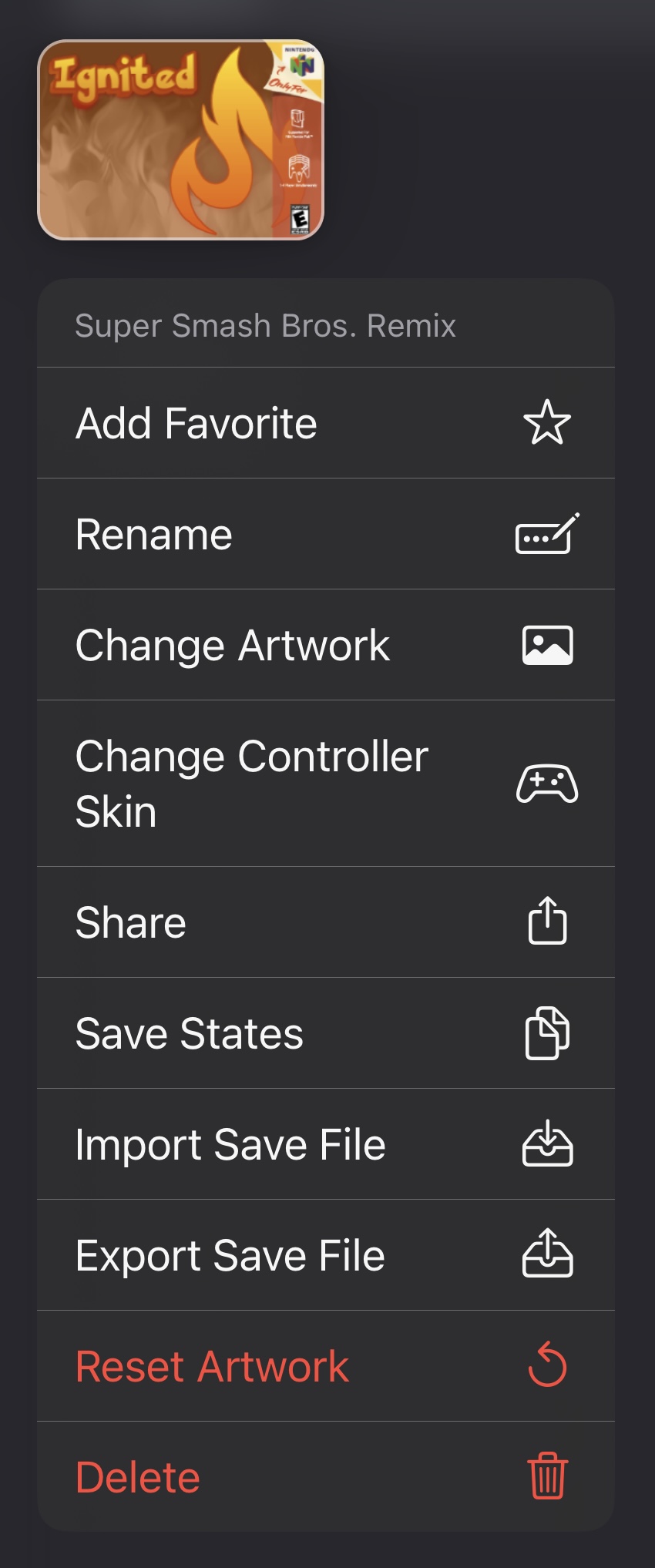
The context menu is accessed by tapping and holding on a game in your library, and has many options for managing your games.
Context Menu
## Add/Remove Favorite
Adds or removes the game from your favorites. Favorite games appear at the top of your games list with a distinct yellow glow to make them easier to find.
## Rename
Changes the title of the game.
## Change Artwork
Changes the artwork for the game. Selecting this item will open a new menu to select the source of the artwork image. Animated `.gif` images are partially supported.
### Clipboard
This option uses an image from the clipboard if you have one copied. To use this option, first search online for an artwork image and copy it.
### Photo Library
This option uses an image from your Photos Library. You must give Ignited access to some or all of your photos to use this option. Ignited will only use photos for this purpose, and they won't be accessed/uploaded otherwise.
### Games Database
This option allows you to search the included game artwork database and use any image found there. Not all games are listed, romhacks aren't supported, and NES and N64 links currently don't work.
### Files
This option uses an image from your files. You will be prompted to select an image using the Files app.
## Change Controller Skin
Changes the prefferred controller skin for the game. This skin will override the prefferred skin for this game's system.
## Share
Shares the game's ROM file. Allows you to easily share and play your games with friends.
## Save States
Opens a page to view all the save states for the game. From there you can manage your states, or tap on one to instantly load the game into that state.
## Import Save File
Imports a save file into the game. Save files can be different types within the same system, and different emulators using the same type may still produce incompatible save files. You should expect possible errors during this process, which are not specifically handled by Ignited. There are save file converters in [settings](/using-ignited/settings) that may solve the issues.
## Export Save File
Exports the game's save file. If this save file is modified by another emulator or program, it may no longer be compatible with Ignited and the [#import-save-file](#import-save-file "mention") option may fail.
## Reset Artwork
Resets the game's artwork to the one it had when it was imported.
## Delete
Permanently removes the game and all its saves, states, artwork and cheats. Use this option with extreme caution! Files will also be removed from your [Ignited Sync](/using-ignited/settings/ignited-sync) backup and cannot be recovered.
# Settings
Make the most Ignited by changing settings to suit your preferences.
Settings is where you can set up syncing, customize features, change skins, map controllers, and more.
# Ignited Sync
# Features
# Gameplay
# Controllers and Skins
# Games Collection
# User Interface
# Touch Feedback
# Advanced
# Cores
# Nintendo 64
# Game Boy Color
# Nintendo DS
# Controller Skins
Customize the look of your systems.
Controller skins allow you to customize the look and feel of each system. Ignited comes with a default skin for every system, that supports all devices and orientations. You can also create your own skins using [this guide](https://noah978.gitbook.io/delta-docs/skins) or import skins created by other users.
## Importing Skins
You can import skins the same way you [import games](/getting-started/games). Once you import a skin, you will see a popup informing you of what devices and orientations the skin supports. Most user created skins do not support all devices and orientations. It is common for skins to only support newer edge to edge screen iPhones, and only one orientation.
## Changing Skins
To change skins, first go to the app settings. scroll down to the Controller Skins section, select the system you want to change skins for, select the orientation you want to change, and choose the desired skin from the list. You can also choose a skin for a specific game using the game's [context menu](/using-ignited/games-library/context-menu).
# Controllers
# Pause Menu
Activate features and save your progress during gameplay.
The pause menu gives you quick access to several of Ignited's features. It is accessible by pressing the '•••' menu button on the default controller skins, or the appropriate input on a connected controller. When the pause menu is opened by a controller, it cannot be closed by another controller, and all hold button mappings are recieved for the pausing controller.
# Save States
# Cheat Codes
# Hold Buttons
# Rewind
# Fast Forward
# FAQ
Answers to common questions users have when using Ignited.
## Q: Can I transfer my games and saves from Delta?
A: Yes. If you have your games backed up with Delta Sync, you can log into the same backup service with Ignited Sync and all your games and saves will be downloaded into Ignited and synced.
## Q: What systems are currently supported?
A: The systems currently supported by Ignited are:
* Nintendo (Nestopia)
* Super Nintendo (Snes9x)
* Nintendo 64 (mupen64plus)
* Game Boy Color (Gambatte)
* Game Boy Advance (visualboyadvance-m)
* Nintendo DS (melonDS/DeSmuME)
* Genesis/Mega Drive (Genesis Plus GX)
* Master System (Genesis Plus GX)
* Game Gear (Genesis Plus GX)
## Q: Where can I get games/ROMs/BIOS files?
A: I can't help you find these files. A simple google search should point you in the right direction.
## Q: Will you add (retro system) to the app?
A: Probably not. I'm not very interested in any new systems beside eventually 3DS. Also I currently lack the technical coding skills to implement new cores into the app. That being said, I will gladly add new systems to the app if other devs put in the effort to add new cores.
# BIOS Files
Information regarding BIOS files and how to import them.
Some emulator cores within Ignited require BIOS files in order to function, which are files that contain data found on a real system's hardware. The emulator cores within Ignited use these BIOS files to emulate things like startup screens and the DS Home Screen, as well as to more accurately emulate games.
***\*BIOS files are not supplied by Ignited, and I cannot help you find them.***
# Privacy Policy
**Privacy Policy**
This privacy policy applies to the Ignited app (hereby referred to as "Application") for mobile devices that was created by Christopher Rittenhouse (hereby referred to as "Service Provider") as an Open Source service. This service is intended for use "AS IS".
**What information does the Application obtain and how is it used?**
The Application does not obtain any information when you download and use it. Registration is not required to use the Application.
**Does the Application collect precise real time location information of the device?**
This Application does not collect precise information about the location of your mobile device.
**Do third parties see and/or have access to information obtained by the Application?**
Since the Application does not collect any information, no data is shared with third parties.
**What are my opt-out rights?**
You can stop all collection of information by the Application easily by uninstalling it. You may use the standard uninstall processes as may be available as part of your mobile device or via the mobile application marketplace or network.
**Children**
The Application is not used to knowingly solicit data from or market to children under the age of 13.
The Service Provider does not knowingly collect personally identifiable information from children. The Service Provider encourages all children to never submit any personally identifiable information through the Application and/or Services. The Service Provider encourage parents and legal guardians to monitor their children's Internet usage and to help enforce this Policy by instructing their children never to provide personally identifiable information through the Application and/or Services without their permission. If you have reason to believe that a child has provided personally identifiable information to the Service Provider through the Application and/or Services, please contact the Service Provider () so that they will be able to take the necessary actions. You must also be at least 16 years of age to consent to the processing of your personally identifiable information in your country (in some countries we may allow your parent or guardian to do so on your behalf).
**Security**
The Service Provider is concerned about safeguarding the confidentiality of your information. However, since the Application does not collect any information, there is no risk of your data being accessed by unauthorized individuals.
**Changes**
This Privacy Policy may be updated from time to time for any reason. The Service Provider will notify you of any changes to their Privacy Policy by updating this page with the new Privacy Policy. You are advised to consult this Privacy Policy regularly for any changes, as continued use is deemed approval of all changes.
This privacy policy is effective as of 2025-03-21
**Your Consent**
By using the Application, you are consenting to the processing of your information as set forth in this Privacy Policy now and as amended by the Service Provider.
**Contact Us**
If you have any questions regarding privacy while using the Application, or have questions about the practices, please contact the Service Provider via email at .
# Support
Please email for support inquiries.